---
updatedAt: 2025-08-06T03:39:11.000Z
agentTools:
projectIndex: https://docs.brx.finance/llms.txt
---
# 🧾 Boleto Pix
The BRX Boleto Pix is a hybrid payment method that combines traditional Brazilian bank slips (boletos) with PIX instant payment functionality.
## Repayment Method Configuration
The system uses a hierarchical approach to determine the payment method for each loan:
1. **Loan-Level Setting**: If the `repayment_method` field is set when creating the loan itself, this takes precedence
2. **Facility-Level Fallback**: If no loan-level method is specified, the system uses the facility's `repayment_adapter.payment_method`
The possible values for this field are:
* `"QR Code"`: 1 QR code will be created for each Loan's installment
* `"Boletos"`: 1 Boleto will be issued for each Loan's installment
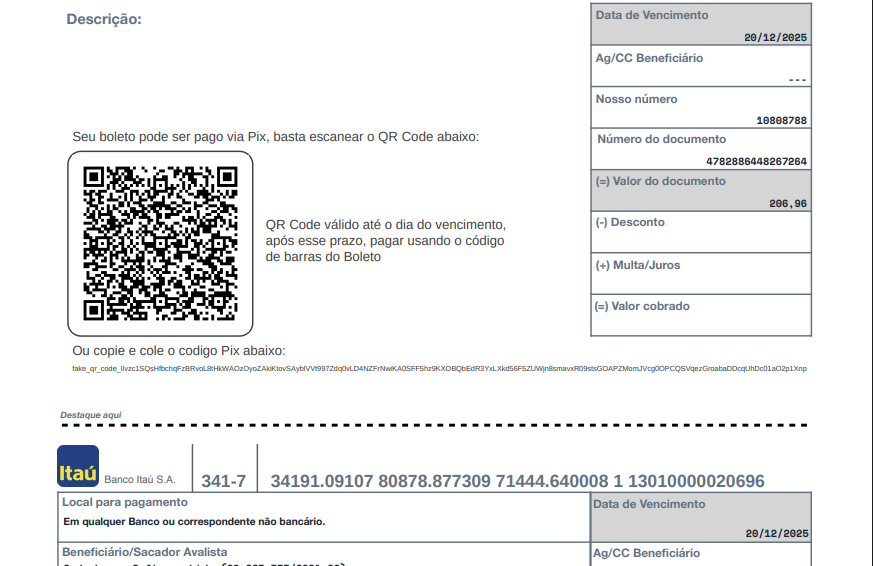
* `"Boleto Pix"`: 1 QR Code and 1 Boleto will be created/issued for each Loan's installment
Here you can check an example of a testing
And here you have a printscreen example:
## API Endpoints
### Creating Loans with Repayment Method
**POST** `/api/loans/`
Include the `repayment_method` field in the request body:
```json
{
"facility": "facility-uuid",
"borrower": "borrower-uuid",
"net_amount": 1000.00,
"interest_rate": 0.035,
"installments": 3,
"repayment_method": "Boleto Pix"
}
```
### Get Loan with Embedded Boleto and QR Code Data
**GET** `/api/loans/{uuid}/`
This endpoint provides a comprehensive view of the loan including all associated boleto and QR code information through the nested repayment schedule structure.
> **Note:** Boleto Pix PDFs with embedded QR codes are automatically created only after the loan has been disbursed (status = "Disbursed"). Monitor the loan status via API or webhook notifications to know when payment instruments become available.
**Response includes:**
* Complete loan details (amounts, interest rates, dates)
* **Repayment schedules** with installments
* **Boleto data** embedded within each installment
* **QR code information** linked to installments
* Borrower and beneficiary details
* Contract and disbursement status
**Example response structure:**
```json
{
"uuid": "loan-uuid",
"repayment_method": "Boleto Pix",
"repayment_schedules": [
{
"installments": [
{
"id": 123,
"fixed_amount": "1000.00",
"due_date": "2024-02-15",
"boleto": {
"stark_id": "boleto-stark-id",
"bar_code": "12345678901234567890",
"file": "https://testing.private.kona.finance/media/boletos/boleto_pix_4782886448267264.pdf",
"status": "registered",
...
},
"qr_codes": [
{
"qr_code_string": "pix-code-string",
"qr_code_base64": "base64-image-data",
...
}
]
}
]
}
]
}
```
> To check all the fields that will be returned, see the API Swagger
**Benefits of this endpoint:**
* **Single request** to get all loan payment data
* **Hierarchical structure** showing relationships between loan → schedules → installments → payment methods
* **Complete context** including loan status and payment history
## Installment Structure
### One-to-One Relationship
Each repayment installment has:
* **Exactly 1 boleto** (stored in `Boleto` model with OneToOne relationship to `RepaymentInstallment`)
* **Exactly 1 QR code** embedded in the boleto PDF (when using Boleto Pix method) and available in the installment qr codes list also
### Payment Processing
When using Boleto Pix, borrowers can pay through:
1. **Traditional bank slip**: Using the barcode number
2. **PIX instant payment**: Scanning the embedded QR code
Both payment methods are linked to the same `RepaymentInstallment` for reconciliation.
### Retrieving Boleto Data
#### List All Boletos
**GET** `/api/boletos/`
Query parameters:
* `status`: Filter by boleto status
* `search`: Search by name, stark\_id, or bar\_code
* `page`: Page number for pagination
* `ordering`: Sort by field (e.g., `-repayment_installment__due_date`)
#### Get Specific Boleto
**GET** `/api/boletos/{stark_id}/`
Returns complete boleto information including:
* Payment details (amount, due date, status)
* Address information
* Bank slip data (bar code, line, our\_number)
* **PDF file URL** (automatically generated if not existing)
* Embedded descriptions and tags
### Boleto PDF Access
The boleto PDF file is automatically generated and can be accessed through **Direct file URL** available in the `file` field of boleto API response.
For Boleto Pix, the PDF includes:
* Traditional boleto information
* Embedded QR code image
* PIX payment instructions in Portuguese
* Copy-paste PIX code string